

Advertorial

Promo codes and checkout savings

A Simpler Way to Check for Savings Before You Checkout

A shopper at a laptop holding a payment card while browsing an online store

Online shopping makes it easy to compare products and place orders, but finding a useful coupon code can sometimes take extra effort. Shoppers may search several websites, copy codes, test them at checkout, and still find that a promotion has expired or doesn't apply to their order.

Browser extensions designed for shopping can simplify this process by bringing coupon discovery directly into the shopping experience.

One option worth exploring is Genie by Groupon, a free coupon extension for Chrome offered by Groupon Inc. (Chrome Web Store)

Why Finding Promo Codes Can Be Time-Consuming

A typical checkout can involve several steps before you know whether a discount is available.

You might:

  • Search Google for coupon codes
  • Open multiple coupon websites
  • Copy and paste different codes
  • Test expired promotions
  • Compare competing offers
  • Return to checkout repeatedly

For people who shop online frequently, having a tool that can perform some of this work automatically may be more convenient.
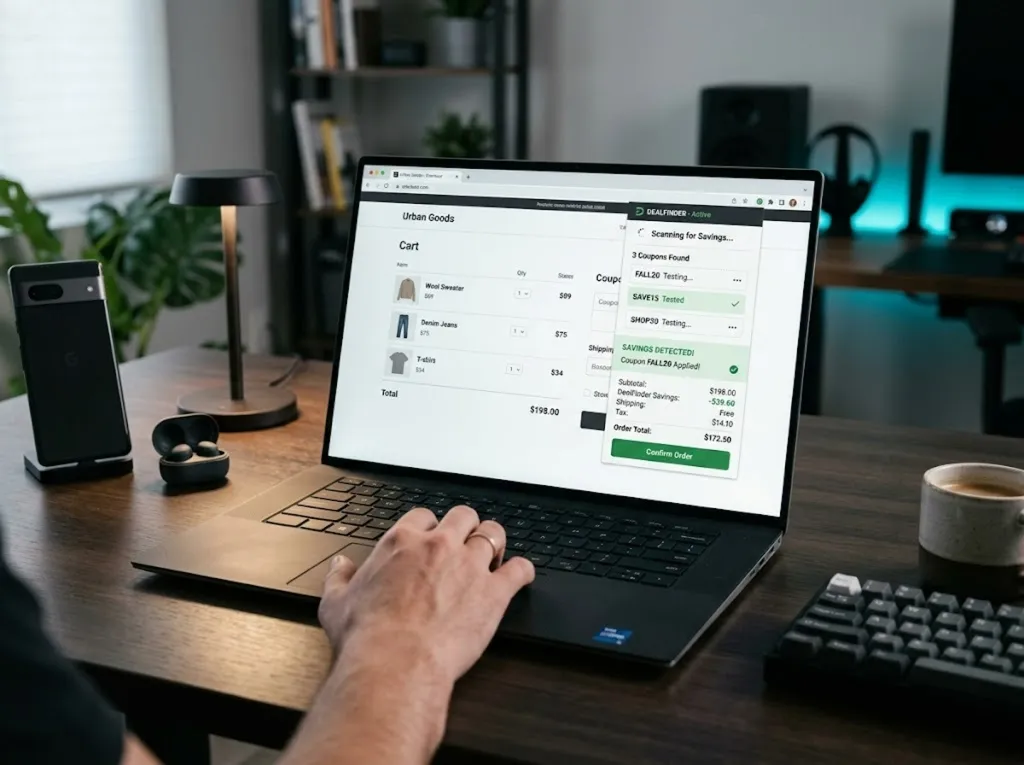
An online checkout page with a promo code field and an order summary
The promo-code field at checkout is where a coupon extension is designed to do its work.

What Online Shoppers Often Look For

Coupon and shopping extensions can offer several useful features, which are set out in the section below.

One Option Worth Exploring

One option worth considering is Genie by Groupon.

According to its Chrome Web Store listing, Genie by Groupon highlights available coupon offers while you browse, so you can decide before you complete your purchase. The listing describes offers across thousands of online stores, says the extension shows what you could save before checkout is completed, and says it confirms when no savings are available. (Chrome Web Store)

Genie by Groupon is available as a free Chrome extension, allowing shoppers to see available offers while browsing participating online stores rather than manually searching for promotions in separate tabs.

What the Listing Describes, and What Can Vary

Drawn from the extension's current Chrome Web Store listing and the caveats that sit alongside it.

What the listing describes

Genie by Groupon

Free Chrome extensionOffered by Groupon Inc, with offers across thousands of online stores

  • Highlights available coupon offers while you browse
  • Shows potential savings before checkout is completed
  • Confirms when no savings are available
  • Works without forced actions or interruptions
  • Free to install and use

What can vary

Before you expect a discount

Results are not guaranteedNo particular savings amount should be expected on every purchase

  • Whether the retailer has a promotion that applies
  • The product and the promotion attached to it
  • Eligibility requirements on a given offer
  • Whether the extension covers the store you are on
  • Coupon exclusions on the items in your cart
See the current listing

The availability of coupon offers varies by retailer, product, promotion, and eligibility requirements, so no particular savings amount should be expected on every purchase. Always review the current listing, permissions and terms before installing. This page may earn a commission from purchases made through its links.

What Online Shoppers Often Look For

Coupon and shopping extensions can offer several useful features, including:

Automatic coupon discovery

Codes are gathered for the store you are on rather than searched for across several websites of your own.

Coupon-code testing at checkout

Candidates are tried against the order, which is the part that otherwise means pasting each code by hand.

A clear answer either way

When nothing is available for the store you are on, that is stated plainly rather than left ambiguous.

Free to install and use

The listing describes the extension as free, with nothing to pay to add it or to see the offers it surfaces.

Shopping alerts

Rather than checking back yourself, a prompt arrives when something relevant to the order changes.

Browser-based convenience

Everything happens in the browser you already shop with, rather than in a separate app or website.

The availability of coupon offers varies by retailer, product, promotion, and eligibility requirements, so no particular savings amount should be expected on every purchase.

What Shoppers Commonly Say About Coupon Extensions

Comments below reflect general, commonly reported sentiment about coupon browser extensions. They are not verified individual reviews and do not represent an aggregate rating.

The comment that recurs is about the tabs. Not having to open a second window to look for a code is the change shoppers notice first.

Commonly reported sentiment about coupon extensions

People often say the plain confirmation matters: being told nothing is available is as useful as being handed a code.

A shopper who wants a clear answer

A common remark is that testing expired codes by hand was the tedious part, and that is the part removed.

A frequent online shopper

A frequent caveat is that coverage differs by store, so some orders return a code and others return nothing.

A shopper comparing retailers

Shoppers generally report reading the data disclosure on the store listing before installing anything.

A cautious installer

Households with regular orders tend to say the benefit shows over a run of purchases rather than on any one of them.

A household with recurring orders

Experiences differ by retailer, product, promotion and eligibility. Nothing above is a guarantee of what you will see.

Features Explained Naturally

Depending on the retailer and your eligibility, Genie by Groupon may provide:

  1. Offers surfaced as you browse

    Available coupon offers are gathered for the store you are on, without a separate search of your own.

  2. A decision before you pay

    What is available is shown while you are still on the page, so you can decide before completing the purchase.

  3. Confirmation when nothing applies

    Where no savings are available for that store, the extension says so rather than leaving the question open.

  4. Free to add to Chrome

    The listing describes the extension as free to install, with no subscription attached to using it.

  5. Shopping-related savings information

    Context about what an order could cost with an available offer applied, gathered at the moment you are deciding.

  6. Browser-based checkout assistance

    The work happens at the checkout stage, which is where a promotional code would normally be entered.

  7. Offers across thousands of online stores

    Coverage is broad, though what appears still differs from one retailer to the next.

The Chrome Web Store lists the extension as offered by Groupon Inc, and the developer discloses there that it will not collect or use your data. (Chrome Web Store)

Who May Benefit

An automatic coupon extension may be useful for:

Frequent online shoppers

The more orders you place, the more often the checkout step comes round and the more often a code could apply.

Deal hunters

Anyone who looks for a promotion as a matter of habit meets the manual search most often.

Families making regular online purchases

Where the same kinds of order repeat through the month, the checkout step repeats with them.

People who compare prices before buying

Weighing sellers before buying is already part of this work, done across several tabs.

Shoppers who regularly search for promo codes

If a coupon search is already part of your routine, this is the part being handled for you.

Anyone who wants coupon discovery closer to checkout

The appeal here is having the tools where the shopping happens rather than in a separate place.

If you only shop online occasionally, manually checking a retailer's promotions may be sufficient. For frequent shoppers, an extension can make the process more convenient.

Notes From People Who Shop This Way

First-name and anonymised accounts, shared for general context. Experiences vary by retailer, promotion and eligibility.

I used to keep three coupon sites open while I checked out. That is the habit this replaced.

Marta · shops online weekly

Testing expired codes one by one was the bit I disliked. Not having to do that is the whole appeal.

A shopper tired of manual testing

Some orders came back with nothing available. I had expected that, so it did not bother me.

Rui · buys a few times a month

I read the data disclosure on the store listing before I installed it. That was worth the few minutes.

A reader who checks the terms

It is one install and then nothing to think about. I shop the way I did before and let it look.

Ana · prefers set-and-forget tools

Where it helped most was the repeat orders. Same basket most months, so the checking adds up over time.

A household buying the same items monthly

Things To Consider

Before installing a shopping browser extension, it's worth reviewing:

  • Supported browsers
  • Participating retailers
  • Extension permissions
  • Privacy practices
  • Whether the extension is free to use
  • Coupon exclusions
  • Whether a promotion applies to your specific order

The Chrome Web Store listing for Genie by Groupon states that the developer will not collect or use your data, and that data is not sold to third parties outside approved use cases. Reviewing the current privacy information before installation is still recommended. (Chrome Web Store)

Frequently Asked Questions

The questions that come up most often before anyone installs a coupon extension.

What is Genie by Groupon?

Genie by Groupon is a free Chrome extension offered by Groupon Inc that highlights available coupon offers while you browse, so you can decide before you complete your purchase. (Chrome Web Store)

Does it find coupon offers automatically?

Yes. The Chrome Web Store listing says the extension displays available coupon offers while you browse participating online stores, without a separate search of your own. (Chrome Web Store)

Does it say when nothing is available?

Yes. The listing says the extension confirms when no savings are available, so you are not left guessing at checkout. (Chrome Web Store)

Will every purchase receive a discount?

No. Coupon availability depends on the retailer, current promotions, eligibility requirements, and the items in your cart. An automatic coupon tool cannot guarantee a discount for every transaction.

What information does the extension handle?

The developer discloses on the Chrome Web Store that this extension will not collect or use your data, and states that data is not sold to third parties outside approved use cases. (Chrome Web Store)

How many stores does it cover?

The listing describes available coupon offers across thousands of online stores. What appears still differs from one retailer to the next. (Chrome Web Store)

Make Coupon Checking Part of Your Shopping Routine

Searching for promo codes doesn't have to mean opening multiple tabs and testing codes one by one. A shopping browser extension can bring coupon discovery closer to the checkout process, so you can see what is available before the order is completed rather than afterwards.

If you're looking for a browser-based tool that highlights available coupon offers as you shop, Genie by Groupon may be worth exploring. It is free to install, it shows what you could save before checkout, and it confirms when nothing is available.

Explore Genie

This page is a paid advertorial brought to you by savehatch.com. It is intended for promotional purposes only and should not be considered independent journalism, editorial content, or professional advice. The content has been created or curated by the advertiser and may include affiliate links. We may receive compensation if you purchase a featured product or service through links provided on this website. Please review our Advertising Disclaimer and Privacy Policy.